A beginner's guide to Google Trends
A well-established marketing tool, this quick gives you a tour of Google Trends and what you can use it for
 Steve Jones
What is Google Trends?
Trends shows the relative popularity of search topics in Google. This means that the interface doesn’t give you an indication of search volume, although that may correspond with an increase in search traffic for a popular term. What it shows is the relative popularity of that term in comparison with all searches for that area and date range.
Google makes a selection of popular search terms. Highly specific queries with low volume are given a 0 rating, everything else is scaled on a 1-100 scale, depending on its popularity in relation to all other searches
Google’s sampling will include data that may have been removed from other search products (such as related searches or autocomplete). Google says it tries to filter out attempts to manipulate or spam the interface, but mentions this might still appear if it becomes popular enough
The data includes real-time information as well as historic data for previous years. This enables you to examine topical trends as well as recurring seasonal ones, or examine the popularity of a topic over time
In a nutshell, Trends will not provide information on every search made; the scope is too vast for that. It can, however, provide a mine of information that is relevant to your business and customer base.
New for 2026:
The Explore page was rebuilt in January 2026 with Gemini AI embedded directly in the interface. The underlying methodology, the 0-100 relative scale, the sampling approach, the real-time and historical data, hasn't changed, but discovering and comparing terms is now largely automated. We cover this in the “Other features” section below.
Getting the Right Region
When you first access Trends, it generally shows you data for the US. So, the first step is to ensure that you are looking at search information that is relevant to your location, which you can change at the top.
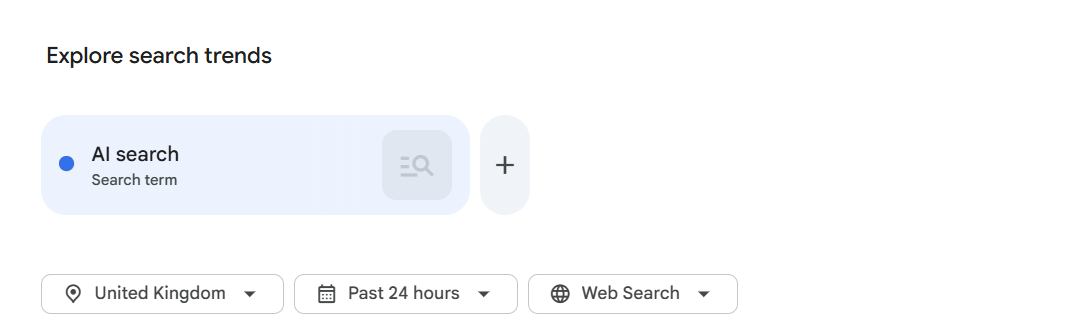
Although it is possible that search trends may be similar across different countries, it’s usually best to isolate the target region you are interested in. You can always use a filter comparison feature to check the popularity between different countries later.
Keyword or entity?
When you start entering a term, Google will make suggestions. At the top of the list will be the term as a general search query. Google will also suggest entities it has identified in connection with your keywords, this means you can explore the popularity of entire topics, working top-down instead of starting from individual keywords and working upwards.
Entities can cover a number of things: topic-related items that share the same concept, specific brands or things that match the query, or even actions. For example:
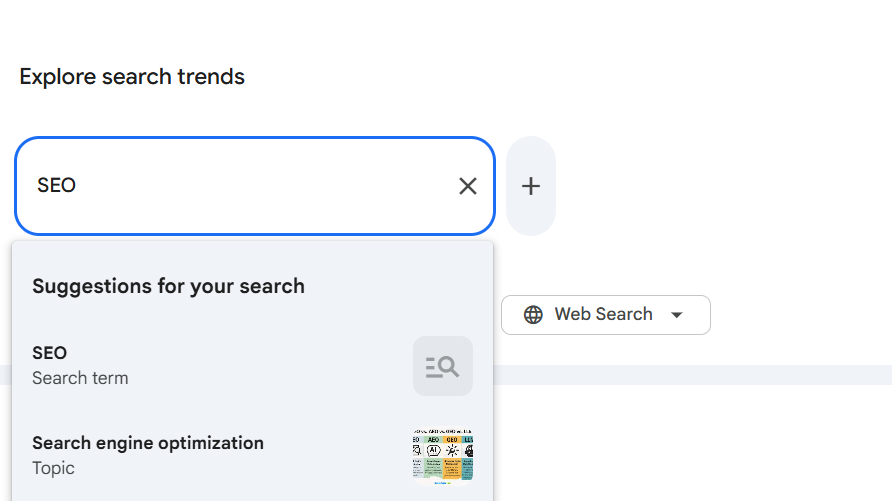
A broad query like "business" lets you select results Google has tagged with organisation markup (from embedded schema and Google Business Profile data), and gives you the option to examine popularity of related searches on Google Maps, plus related topics such as "Job"
A general phrase such as "virus" can be narrowed to a computer virus versus a biological virus, or to whichever meaning is currently topical
When looking at entities, Google will usually have more interesting data to offer, since these have been identified as distinct search topics. If you use plain search terms instead, there will be no ranking shown if the term isn't a popular search. Although you can compare search terms and topics on the same graph, the two are measured differently, so be careful with your subsequent analysis. topics include terms with a similar concept, whereas searches are a more literal match to the query string.
If you want to narrow the focus of a keyword search, you can use the following operators:
Search term | Type of results you can see |
tennis shoes | Results can include searches containing both tennis and shoes in any order, plus related variants like "red tennis shoes" or "tennis without shoes." No misspellings, synonyms, plural or singular versions are included. |
"tennis shoes" | Results include the exact phrase inside double quotation marks, possibly with words before or after, like "red tennis shoes." |
tennis + squash | Results can include searches containing the word "tennis" OR "squash." |
tennis -shoes | Results include searches containing the word "tennis," but exclude searches with the word "shoes." |
center + centre + centere | Results include alternative spellings like "centre" or common misspellings like "centere." Trends treats each version as a different search. |
You can then add further terms and topics to compare, or edit and remove an existing search term, directly on the graph:

New for 2026
Google's Gemini-powered side panel can now suggest and add comparison terms for you automatically - more on this in “Other features” below.
Using filters
Trends also offers filtering options so you can further refine the data:
Date range
This lets you change the period over which a term is examined. You can look at long-term trends to see if terms or topics are gaining or losing popularity, or switch to real-time data covering the last few hours to surface hyper-topical interest, such as the time of day a query is most popular.
The date range lets you check that a topic doesn't have declining visibility, and helps you identify regular, predictable surges of popularity to coordinate campaign activity around
Regular surges of popularity can also indicate content gaps, where creating useful material might capture recurring interest and traffic. Be careful, however, of creating content for genuine one-off ‘spikes’, topics that surge then die off completely, since interest is likely to have passed before content is written and indexed
Categories
This lets you specify a topical category, so if your chosen term has multiple meanings, you can isolate the correct context and make your analysis more accurate. This can help refine results where Google doesn't automatically suggest the right context when you enter your key terms.
• Particularly useful for brand terms where there's potential ambiguity with non-brand queries, or brands operating across different sectors
• Can also highlight where a topic behaves differently across sectors, for example, a general term might be flat in the Business category over the last 90 days, but show a clear seasonal pattern once filtered to Health, or another relevant category
Search results (property)
This lets you refine which type of search results you're comparing. By default this is set to ‘web search’, covering everything, but you can also specify particular Google properties: Image search, News search, or YouTube search.
It's worth checking the popularity of topics on the search properties most relevant to them. A term might plateau in general web search while still climbing steadily on YouTube, for example, a sign that video content, not blog content, is where the audience is currently engaging.
Data comparison
If you want to compare data from different regions (comparing different time periods in the same chart can cause issues), click the three dots to edit the search term and choose ‘change filters’.

This lets you compare trend data between different countries, or against a global average (worldwide), to see whether interest in a region is unusual.
New for 2026
The redesigned Explore page now supports comparing up to eight search terms at once (up from five), each assigned its own colour and icon so they're easier to track on a busy chart.
Other features
The main feature set relies on users knowing what questions to ask — search terms, topics, and so on. Trends also has a section that shows related topics, which can surface queries you hadn't considered from your first search.
Top and rising terms
For each keyword or topic, Trends shows a panel listing the top and rising searches related to that query, along with a regional breakdown.
As mentioned earlier, Google samples a range of searches from the millions it receives and displays the ones most commonly associated with the query. Top searches are those most frequently associated with the term, in the location and timeframe you've selected.
A toggle switches between ‘top’ and ‘rising’ searches. Rising searches are those that have increased in popularity during the selected timeframe compared with the previous period. Terms marked ‘Breakout’ have grown by 5,000% or more, and are worth considering as emerging topics.
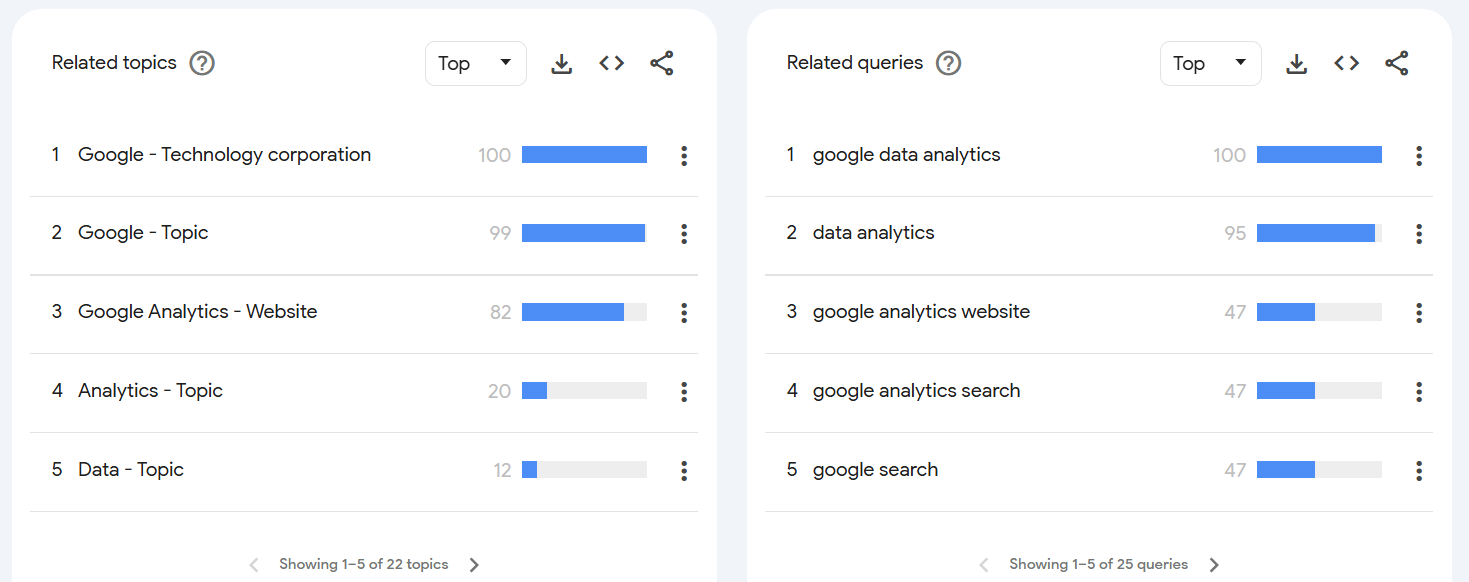
In some cases, top and rising terms will be similar or identical, but often the rising list surfaces the more useful, emerging language your audience is actually using - helping you spot search intent that doesn't yet match an existing page or product
The category filter can help eliminate ambiguous terms that aren't actually relevant
The panel only displays the first few terms, but the full list of top and rising terms can still be downloaded via the export option
Regional data can be toggled between subregions and cities to isolate particular areas of growing search popularity, and can also be exported for closer analysis
New for 2026: The number of rising queries shown per timeline has doubled, so there's more to review before you need to export the full list.
The Gemini-powered side panel
Google rebuilt the Explore page in January 2026 with its Gemini AI models embedded directly in the interface, via a ‘Suggest search terms’ button in the top-right corner. This is the biggest change to how Trends is actually used day-to-day, so it's worth understanding properly.
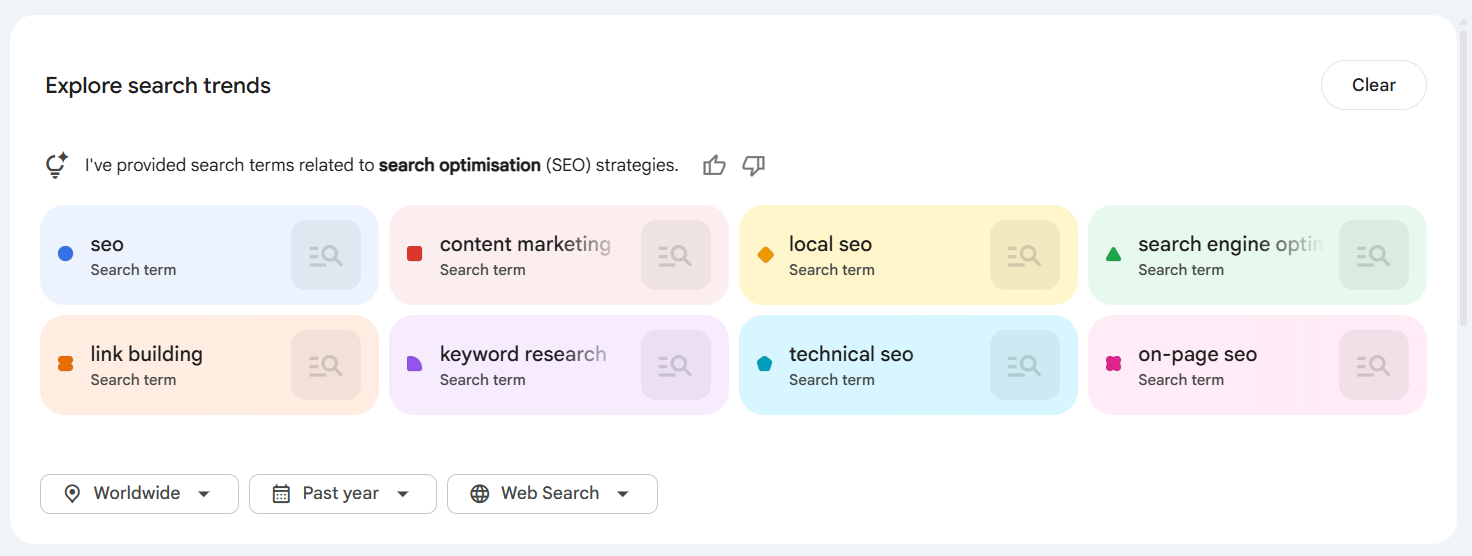
You can type a single keyword, or a natural-language sentence describing what you're researching, and Gemini will identify and add up to eight relevant search terms to the graph for you
The side panel also surfaces related ideas to explore further, for example, searching “golden retriever” might prompt suggestions like “hypoallergenic dog breeds” or “large dog breeds”
Any suggested term can be edited by hovering over it, so you can steer the AI's suggestions towards your specific research focus rather than accepting them as-is
The panel offers follow-up prompts designed to help you dig into deeper insights and broader trends related to your original search
A couple of practical caveats worth knowing before you rely on this for client work:
As of writing, the Gemini side panel is desktop-only, there's no equivalent on mobile, so this isn't something to demo from a phone in a client meeting
Google is explicit that these generative features are experimental and may occasionally surface inaccurate suggestions, so treat the output as a fast way to widen your net, not as a source of truth in itself, verify anything client-facing the way you would any other AI-generated research
For agency use, this is best treated as an accelerant for the discovery step that used to be manual: instead of guessing at ten variations of a seed term, let Gemini propose the set, then apply the category, region and property filters covered above to sense-check which of those suggestions are actually relevant to the account.
Tips and tricks
Some general techniques for getting useful data out of Google Trends.
Compare and contrast
It's tempting to take the first view at face value, but this can be misleading. Check different views of the same topic to make sure you've got the right context and understanding, the last 30 days can give a very different impression to a 12-month view, which might reveal a spike your shorter date range doesn't capture.
Think about people first, keywords second
While Trends is a useful place to check high-volume keywords, the most useful insights come from thinking about the people you're trying to reach. Focusing on what people are trying to achieve in search engines can lead to realisations in completely unexpected areas. Looking at things from a customer's perspective, their daily routines, the challenges and problems they face, can unlock ideas and understanding about how you can help them.
Brand awareness
Enter your brand name to check that popularity isn't waning, or being confused with unrelated, ambiguous searches, something third-party keyword monitoring tools may not always differentiate correctly.
Brand searches tend to land on pages from the brand's own domain, so are ‘easy click’ traffic
Appearing as a recognised entity shows Google is aware of the brand and likely to return it for searches it thinks are relevant
Declining brand popularity may reflect a genuine loss of interest, or increased competitor activity in search marketing
Know your seasonality
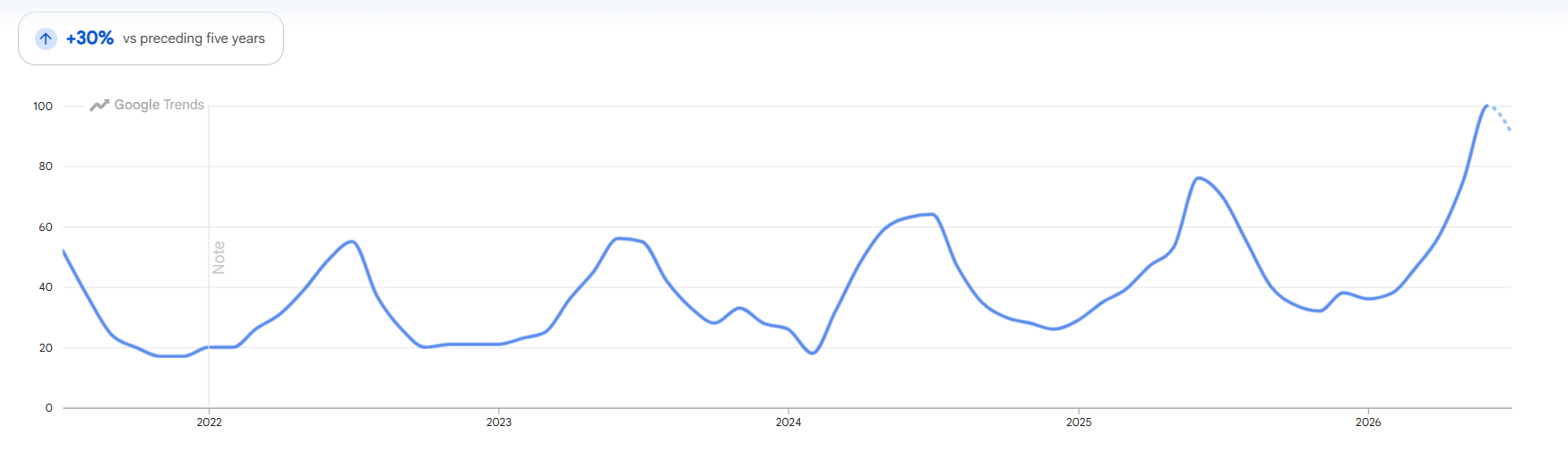
Very few searches maintain an upward trend indefinitely. Look at products, services and even core pages to determine whether there are regular peaks in interest, then time marketing to arrive before or during that peak.
This can be surprising. Looking at the UK over several years, ‘gin cocktails’ isn't searched most during the hot summer months, it peaks around the Christmas to New Year period. That suggests gin cocktail popularity is more closely tied to social occasions and time off than the weather, which should inform when a drinks brand times a summer campaign versus a festive one.
The image below is showing the trends for 'Air conditioning' in the UK over the last 5 years.
What are the niches around known events?
Searching for a specific known event can open up content opportunities in related topics and top-and-rising suggestions. When an event is postponed or rescheduled, for example, queries for ticket refunds, new dates and rebooking tend to spike well ahead of the event itself, giving you a content window most competitors haven't spotted yet.
Archive footage or past coverage can also surface in related YouTube results for some queries, which is worth bearing in mind as a channel to keep an audience engaged between events.
Emergent and related topics
Top and rising terms can highlight useful topical areas where a site doesn't yet have any good-quality content.
If a topic is fundamental to the brand, it can be built into the main site architecture as a proper landing page. More peripheral topics are better handled on a topical platform, such as a blog
Check what's already ranking for these queries before committing. Genuinely rising topics often have thin competing content, which is your opportunity, but an established topic may already have a well-resourced authority source occupying the space
The Gemini side panel is a fast way to widen this search: feed it a seed topic and use the related ideas it surfaces as a shortlist of angles to check against what's currently ranking, rather than relying on a single keyword tool's suggestions
Regionality
Search topic popularity can be checked against regional interest to build a hyper-local content strategy, or to double-check paid search is correctly targeted.
Bid weighting can be applied to areas where the target term is popular and likely to attract volume
Broader search terms can be applied to areas where the term is popular, and will likely drive interest in other related terms
Website content can be targeted at specific regions if relevant, use Trends to see which search topics matter most in the areas a service covers, and make sure that content is reflected on the relevant pages
Check keyword seed lists
Plenty of keyword tools generate long lists of suggestions based on terms that have appeared at some point in a related Google search. Most are sorted by estimated volume, which for non-paid interfaces relies on abstracted figures Google provides, or a tool's own in-house benchmark.
Running these through Google Trends and filtering by category or region can help illustrate seasonal periods of interest for terms you hadn't initially considered, and can trigger further content ideas via the related ‘rising’ and ‘top’ terms, or, now, via the Gemini side panel's suggestions.