Google Analytics frequently asked questions
Our team has put together answers to some of the most common questions about Google Analytics 4. From bounce rate to content grouping, our information will help you get to know Google's new reporting platform a little bit better.
 Julian Erbsloeh
1.Google analytics 4 training
Google Analytics 4 training
Before we get into our expansive selection of FAQs and best practices, why not take a look at our latest selection of Google Analytics 4 training courses. If you need any help with any of the content and advice listed in our FAQs below, talk to us about your analytics needs to see how we can help level up your organisation.

Google Analytics 4 Essentials
Google Analytics 4 Advanced
2.Google analytics 4 FAQs and best practices
Google Analytics 4 FAQs
What's the difference between GA4 and GA or Google Analtyics?
Google Analytics has been around for many years. In 2020 Google launched the then new Google Analytics 4 or GA4. The reason this was not just treated as the same platform under the familiar Google Analytics name was that the shift in data model, functionality and look was so significant, that Google felt it deserved a clearer distinction.
What followed was a mostly painful transition from the good old days into the new data model and an interface that wasn't quite good enough at the time. Fast forward a few years, Google have put significant effort and budget into bringing the platform up to speed. And once that was completed, Google announced that GA4 was now going to be simply called Google Analytics or GA again. Simple, right?
Why does Google Analytics look so different?
If it's been a while since you last logged in, you're most likely comparing today's Google Analytics 4 (GA4) with the old Universal Analytics (UA), which Google fully switched off in July 2023. It isn't just a redesign: GA4 uses a different measurement model entirely. Instead of organising data around "sessions" and "pageviews", everything in GA4 — a pageview, a scroll, a form submission, a purchase — is recorded as an "event". That's why the reports, terminology and navigation all look unfamiliar even to people who knew the old platform well.
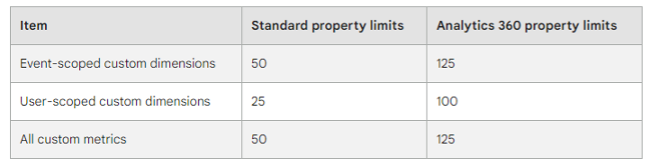
Are custom dimensions set up per property, i.e. do you get 25 custom dimensions per property?
These are the current limitation of custom dimensions.
Is deleting custom dimensions the same as archiving?
In effect, deleting custom dimensions will remove them from your GA4 platform, and they will only be available when you reinstate the custom dimension. However, if you want to review all events available in your property, ensure you set up your BigQuery connection, where you have a permanent store of your GA4 user-level data for every triggered event.
Is Google Analytics blocked for all Apple/Safari users?
No — this is a persistent myth. Safari's Intelligent Tracking Prevention (ITP) does not block the GA4 script from loading or block hits from being sent. What it does is aggressively shorten the lifespan of cookies GA4 sets via JavaScript (down to just 7 days, or 24 hours if the link included tracking parameters from a known ad platform), and it blocks third-party cookies outright. The practical effect is that Safari users are miscounted as "new" more often, and that long or cross-domain customer journeys become harder to stitch together — not that they vanish from your reports entirely.
Do you need Google signals to collect demographic data?
At present, yes. The following link provides a great in-depth review of the features dependent on Google Signals.
https://support.google.com/analytics/answer/9445345?hl=en#zippy=%2Cin-this-article
What are key events and how do I set them up for my website?
"Key events" is GA4's current name for what it previoiusly called "conversions" — the important actions you want to track, like a purchase, form submission or newsletter sign-up (functionally nothing has changed, only the label). To set one up: the underlying event must already be firing and visible in GA4 first. Then go to Admin > Events (or Admin > Key events), find it, and toggle it on — or click "New key event" and type its exact name if it was implemented through Google Tag Manager but hasn't appeared yet. You can mark up to 30 key events per property, and it can take up to 24 hours to reflect in standard reports.
How can I see data for users that decline cookies in my GA?
This is done through Google Consent Mode's "behavioural modelling" feature. With Consent Mode implemented in "Advanced" mode across your whole site, GA4 can still receive anonymous, cookie-free pings from users who decline analytics cookies, and — once your property has enough traffic (roughly 1,000+ daily consented and non-consented events, sustained for at least 7 days) — it uses machine learning trained on your consented users' behaviour to estimate what the non-consented users likely did. This fills in aggregate metrics like sessions and key event rate; it doesn't recreate individual events, and GA4 doesn't clearly flag which numbers in a report are observed versus modelled.
My Google Analytics isn't showing any data, why?
Work through these in order: check the GA4 tag is actually installed and firing (via GA4's Realtime report or DebugView, or Tag Assistant if it's deployed through Google Tag Manager); confirm the Measurement ID matches your property; check the GTM container has been published, not just saved in preview; check you're not filtering out your own traffic or looking at the wrong property/date range; and remember that standard reports can take 24–48 hours to populate even once tracking is working, so Realtime is the fastest way to confirm things are firing correctly right now.
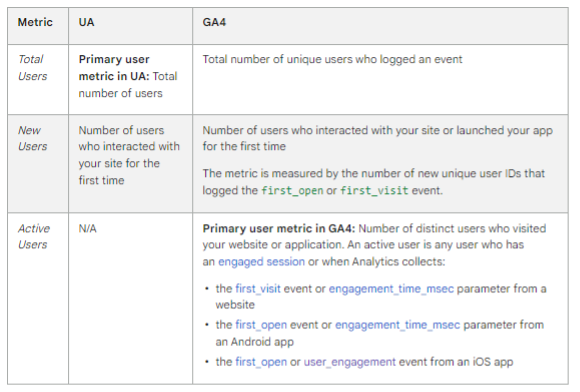
Given the change in how Google identifies users, has the definition of a 'new user' changed too?
This is highly dependent if you have a user id in place, allowing cross-device and cross-platform tracking. This handy box from Google is helpful as a reference point.
GA4 now has a metric of Engaged Sessions, for which one of the measures is a session of ten seconds or more. Is ten seconds the accepted time for what the industry would consider 'engaged'?
The ten-second session length has been used for many years on Firebase and proved a very successful measure of landing screen and engagement. However, ten seconds is a relatively short time on a web page that doesn't redirect. This number is a challenge as some websites may redirect to an app and therefore have a low web-engaged session. If you see short session lengths constantly, you should investigate these users to understand what is happening. We recommend analysing your client behaviour and your website or app goals on that page.
Is location data a GDPR breach, or because it is so general, it falls under anonymised data?
If you use Google's geo.location fields, these are mediated to prevent identifying users and, therefore, not a breach; for example, if sending to GA4 as a URL, we recommend referring to your GDPR consultant to clarify.
Why use GTM instead of just adding the GA4 code straight to my site?
The main benefit is central control: once GTM is installed, you can add, edit, or remove tags (GA4, Google Ads, Meta Pixel, and others) through GTM's interface without needing a developer to touch the site's code each time. It also gives you built-in preview and debug tools, version history so you can roll back changes, and — importantly for compliance — a much easier way to manage consent, since you can block or allow individual tags based on what a visitor consents to. If you genuinely only ever plan to run one tag and never touch it again, the benefit is smaller, but most businesses end up needing more than one tracking script sooner or later.
How can I identify traffic from AI or when my website features in an AI overview and the user never came to my site?
For traffic that does click through: GA4 introduced a native "AI Assistant" channel in mid-2026 that automatically groups recognised platforms like ChatGPT, Gemini and Claude, but it only catches sessions where a referrer header is actually passed — a large share of AI app traffic strips this, so it still lands in Direct. You can supplement this with a custom channel group using a regex to catch known AI domains in the Session source dimension. For the second part of your question — someone reading an AI-generated answer or Google's AI Overview and never clicking through — there is currently no reliable way to measure this in GA4 or any standard analytics tool. If no click happens, no session is generated, so it's invisible by definition; this remains a genuine blind spot across the industry, not something specific to your setup.
Do I need a developer to use Google Tag Manager, or can I do it myself?
For basic setup — installing the container, firing GA4's own tag, tracking clicks or standard form submissions — a marketer can usually manage this directly in GTM's interface without writing code. Where you'll need developer involvement is anything that depends on a well-structured "data layer": ecommerce tracking, single-page applications (SPAs), or custom events that don't correspond to a simple click or page load. In practice, we'd recommend a developer for the initial setup and any data layer work, after which your team can usually make smaller day-to-day changes independently.
What is PII?
PII is personal identifying information which allows you to identify a user, such as names, email addresses but also post codes. The data protection authorities take the issue of PII very seriously so if you think you may have PII in your data, this deserves your undivided attention.
The data is often erroneously sent in pagepath and, if sent, needs resolving as it is against GA4 guidelines and often in breach of GDPR.
https://support.google.com/analytics/answer/6366371?hl=en#zippy=%2Cin-this-article
If we spend a lot of budget on ads, which attribution model should we use and why?
Attribution models are specific to marketing strategy, and generally, we recommend reviewing the cross-model comparisons and conversion paths to understand if there is a great deal of variance. In addition, if you often use multi-channel marketing strategies, you should consider Data-Driven attribution to understand the impact of your cross-marketing impacts and accurately attribute conversions across multiple channels if appropriate.
Why is data in Meta showing so many more visits and conversions than Google Analytics?
Meta's reporting includes view-through conversions by default (someone who saw the ad but never clicked) using its own attribution windows, and the Meta Pixel is a separate tracking mechanism from GA4 with its own exposure to ad blockers and browser privacy restrictions. GA4 only ever counts people who actually landed on your site and were successfully tracked. This gap is standard across the industry — the two platforms are answering different questions (ad-level engagement vs. on-site behaviour), so use each for what it measures well rather than expecting the totals to align.
How do I know if my cookie banner is set up correctly?
A few checks worth running: the option to reject non-essential cookies should be just as visible and easy to use as the option to accept (regulators have explicitly flagged banners that bury "reject" in a sub-menu); no boxes for analytics or advertising cookies should be pre-ticked; and — critically — GA4 and any marketing tags should not fire at all until consent is actually given, which you can verify in Google Tag Manager's Preview mode. If you're using Google Consent Mode, confirm the default state is set to "denied" until a visitor actively accepts. Because this genuinely is a compliance question with real financial exposure, we'd recommend a proper technical audit (many consent management platforms and specialist tools can check this directly) rather than relying on how the banner looks on the page.
If you are unsure about your cookie banner compliance, get in touch and we will take a look for you.
What is server-side tagging, and does my business actually need it?
Normally, a visitor's browser sends separate requests directly to each vendor — Google Analytics, Google Ads, Meta, and so on. With server-side tagging, the browser sends one request to a server-side container you control (hosted on somewhere like Google Cloud, or a managed provider such as Stape), which then forwards the data on to each vendor. The benefits are real: less JavaScript running in the visitor's browser (faster page loads), more control over exactly what data leaves your server, and greater resilience against browser restrictions like Safari's ITP and some ad blockers. The trade-off is added technical complexity and an ongoing hosting cost, so it tends to make sense once you're running paid media at meaningful scale rather than for a small, low-traffic site.
The numbers between Google Analytics and my campaigns in Google Ads and Meta are not matching, why?
This is expected, not a fault to fix. GA4 and ad platforms use different attribution windows and models — Google Ads and Meta often count a conversion from someone who merely saw an ad (a "view-through" conversion) without ever clicking through to your site, which GA4 has no way to see. Session definitions, cookie/consent restrictions, and ad blockers also affect each tool differently. Treat each platform as authoritative for what it's best placed to measure — ad platforms for ad-level delivery and their own attributed conversions, GA4 for what actually happened on your website — rather than trying to force the totals to reconcile.
Do I need user consent to track them with Google Analytics?
In the UK/EU, yes. Under GDPR and the ePrivacy rules, analytics cookies are considered non-essential, so you need a cookie banner that gets clear, opt-in consent before those cookies are set — with an equally easy way to reject as to accept. Google's Consent Mode is designed to sit between your consent banner and GA4: if someone declines, GA4 can still receive anonymous, cookie-free "pings" rather than nothing at all. Requirements do vary by country and this is genuinely a legal question, so we'd always recommend checking your specific setup with a privacy specialist or lawyer.
Is GTM still needed to set up tags and triggers for custom events, or do we set these up on GA4?
We highly recommend using GTM as the more strategic and robust solution.
Should I use enhanced measurement events or set up my own custom event tags for site search, form submissions, pageviews etc?
Enhanced measurement is GA4's built-in, no-code option, and it's a fine starting point, but it has real limitations: site search only works if your search results appear as a URL query parameter, form tracking is known to be unreliable and doesn't handle AJAX-style forms properly, and scroll tracking only fires at a fixed 90% threshold. For anything that matters to your business — a lead form, a key piece of content, an ecommerce interaction — we'd recommend disabling the equivalent enhanced measurement event and building it properly through Google Tag Manager instead, so you control exactly what's captured and avoid double-counting.
Why do I see cross-channel in conversion paths?
Google now allows cross-channel attribution as part of data-driven models. As such, they will identify if your users have accessed your website across multiple channels (both paid and organic). This feature means you will see multiple networks in your conversion paths.
Do you have any advice/training on commercial eCommerce reports in GA4?
We have a great training function and can support your use of eCommerce reporting in GA4. If you are confident with GA4 explorer, you can use the eCommerce template using the following link.
Is the data I see in my Looker Studio dashboard including modelled data or not?
Looker Studio itself doesn't create or separate modelled data — it simply visualises whatever GA4 is already reporting through its connector. So the real question is whether your underlying GA4 property has Consent Mode behavioural modelling active and its "reporting identity" set to "Blended". If it is, the aggregate figures flowing into your Looker Studio dashboard can include a mix of observed and modelled data without any visual distinction between the two. To check, go into the GA4 property itself and look at the reporting identity setting, and for the small "estimated data" indicator that appears next to affected metrics in GA4's own reports.
What's the difference between a tag, a trigger, and a variable in GTM?
Think of it as what, when, and with what information. A tag is the snippet of code that actually sends data somewhere — your GA4 configuration tag, a Google Ads conversion tag, a Meta Pixel. A trigger is the condition that tells a tag when to fire — a page load, a button click, a form submission. A variable is a piece of dynamic information that tags and triggers can use, such as the current page URL, the text of a clicked link, or a value pulled from your site's data layer. All three work together: the trigger decides the moment, the tag decides the action, and variables supply the detail.
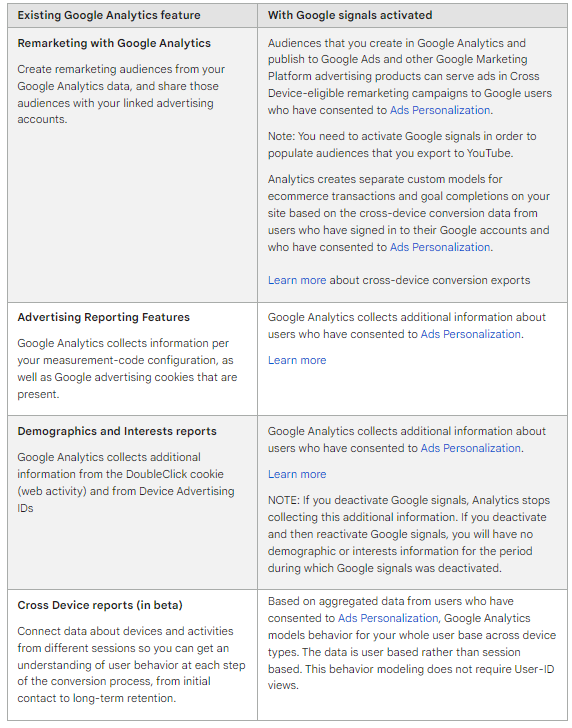
What do you lose from a marketing perspective besides demographic information if you have Google Signals turned off?
If you enable Google Signals, you will benefit from enhanced remarketing and audiences you populate for YouTube. See the handy table below that Google provides to compare standard and non-standard for remarketing and advertising, showing the variances.
https://support.google.com/analytics/answer/7532985?hl=en#zippy=%2Cin-this-article