Cross-device tracking with Google Analytics
- Published
- 19 July 2018
- Read time
- 5 min read
Google has just announced the launch of the new Cross-Device tracking capabilities within Google Analytics, a launch we have been eagerly anticipating here at Fresh Egg.
 Julian Erbsloeh
New Cross-Device Reports
Device Overlap report – an incredibly useful, single view summary of device usage in a Venn diagram, as well as categories of multi-device audiences.
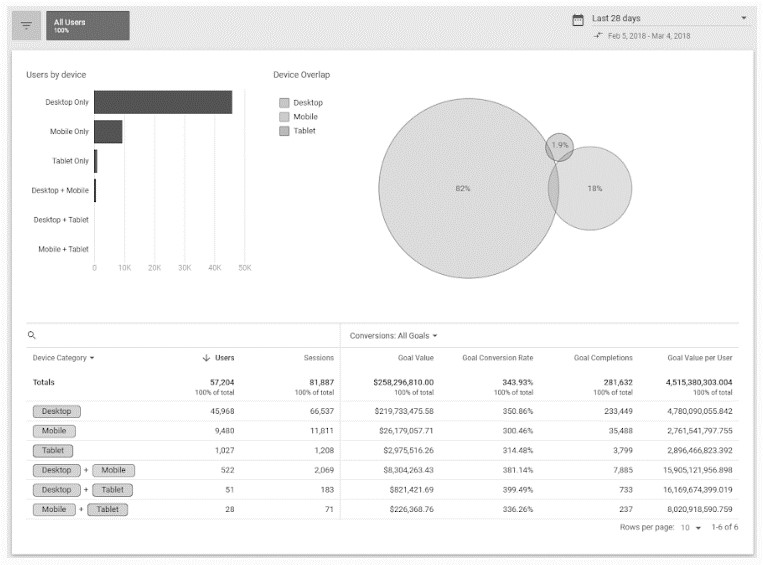
Device Paths report – similar to the MCF conversion paths, this new report provides an overview of frequent user journeys by device. This provides valuable new insight into the user experience and the role each device plays across the customer journey.
Acquisition Device report – is there a device type users frequently start their converting, multi-visit journeys from? This is the report that will tell you just that so you can adjust your bidding strategy and device targeting accordingly.
What's the Catch?
So, to make use of cross-device tracking the user must be logged into a Google account AND have opted in into Ads Personalisation (so not so much a catch, more a hope the user has played ball). From your side it requires you, or your analyst, to activate Google signals in GA settings. For this to work, Advertising Reporting Features also needs to be enabled ("but Julian, didn't we just disable that for GDPR compliance?" "Yes, we did and we're working on that one and will come back to you …" )
Of course, once everything's set up we can't say how many users are likely to match the criteria without testing it thoroughly. In the meantime, the answer is likely going to be 'it depends' as there will be nuances between industries, countries and the demographics of your audience.
What we do know for certain is that this is a massive step in the right direction from Google. Un-locking cross-device behaviour, outside of complex and expensive attribution modelling, is a key milestone for web analytics teams and we are very excited to finally get our hands on some of this data.
So, to get it set up for yourself, here's what you, or your analytics team, need to do:
How do I activate Google Signals in my GA account?
This is a new feature, and not available on all Google Analytics accounts yet. Officially, Google says the feature will roll out to 100% of accounts over the next two weeks. Information on activation can be found here: https://support.google.com/analytics/answer/7532985#enabling
How does Activate Google Signals feature work?
It works by using the Google signed-in data (assuming that users will be logged into their Google or YouTube accounts on their devices) and the cookie expires after 26 months. However, if you've set the Data Retention setting to anything shorter, Google will respect the new shorter time-frame.
This feature requires users setting their Ads Personalzation settings to ON, for Google to stitch the sessions together for a single user. The data is fully anonymized, in order to be GDPR compliant and users can change their settings anytime by going to: https://adssettings.google.com/authenticated
However, there are some concerns over whether the enhanced Advertising Features are GDPR compliant without the users' explicit consent.
Does Activating Google Signals affect any existing GA reports?
The marketing reports will include aggregated data if users have the Ads Personalzation feature switched on:
Remarketing with GA
Advertising Report features
Demographics and interests reports
Cross-Device reports
What features are unsupported?
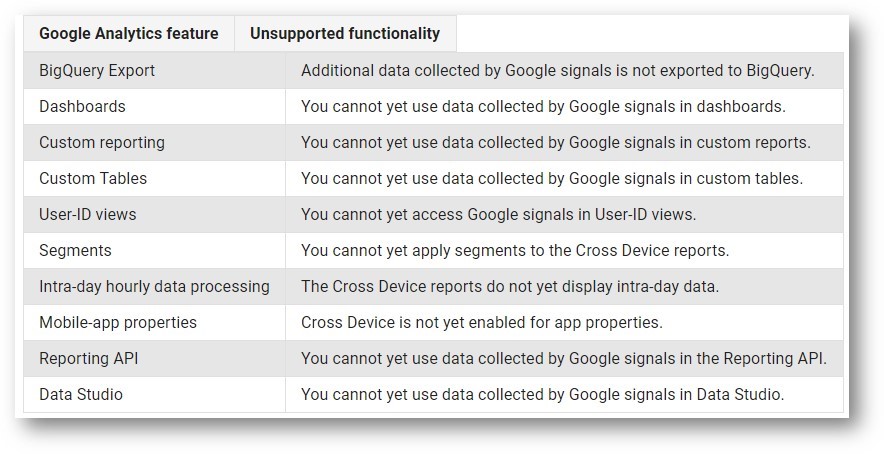
As you would expect with a brand new feature, it does not really tick all the boxes on launch. Some of the big ones for us are segmentation, custom reporting and Data Studio integration. But we don't want to be greedy, we are very happy with this first phase of the feature and hope for future releases to address some of the unsupported features on this list:
If you have any questions at all on the new Cross-Device capability of GA, or anything at all related to analytics, do not hesitate in contacting us and we will be more than happy to help.