Talk to us

1.
Introduction

Local SEO matters for any business with a physical presence, but multi-location brands have a harder job. You’re building visibility for every branch while keeping them all consistent under one brand. In effect, you’re running a local SEO strategy for each location at once. Here’s how to do it without losing control.

This post is part of our guide to how to do local SEO.

2.
Why local SEO for multiple locations matters

You want searchers to find your nearest branch. For Google to show the right one, every location needs its own presence: a Business Profile, a page on your website and its own listings.

Google’s local ranking guidance sets out three factors:

  • Relevance: how well a profile matches the search.

  • Distance: how far each result is from the searcher.

  • Prominence: how well known the business is.

Distance is on your side: more locations means being near more people. But each location still has to earn relevance and prominence in its own market.

There’s a brand effect too. A customer who struggles to find or visit one branch is likely to think twice about the brand as a whole.

3.
10 steps to optimise local SEO for multiple locations

These steps take you from understanding each market to measuring every branch. Some are one-off setup tasks, like bulk verifying your Business Profiles. Others, like reviews, citations and local links, need ongoing attention at every location. Work through them in order if you’re starting out, or use them to audit where your current approach has gaps.

4.
Step 1: Understand your competition in each market

Competitors vary by area. Analyse both local players and national rivals’ overall approach:

  • Local rivals ranking for your keywords in each area

  • Keyword gaps, theirs and yours

  • Local rankings across the map

  • Their locations against population centres

  • Their Business Profiles, for gaps in hours, services and facilities

  • Their websites: location pages, localised content and structured data

  • Their links and citations

  • Their local engagement, online and offline

Small operational details can decide it. Closing an hour later or offering click-and-collect can make the difference.

5.
Step 2: Create and manage a Business Profile for each location

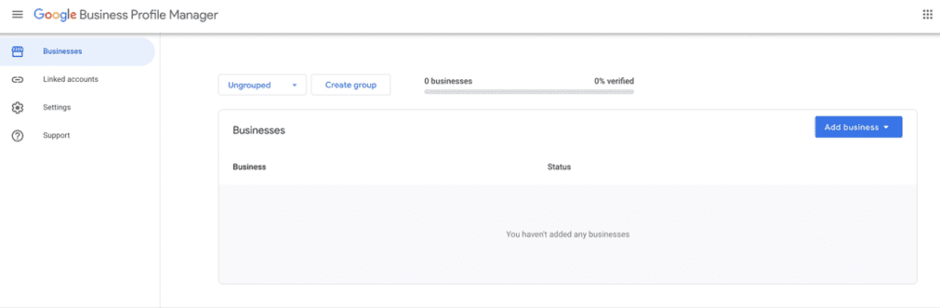
In Business Profile Manager:

  1. Click Create group and name it.

  2. Click Add business, then Import businesses.

  3. Upload a spreadsheet of all locations (you can download Google’s template).

  4. Click Select file to upload.

Fill in every relevant field: store code, name, address, locality and sub-locality, latitude and longitude, phone numbers, website (the location page, not the homepage), categories, hours and special hours, opening date, photos, attributes, amenities, payment methods, and menu or booking URLs.
Bulk verification. With 10 or more locations of the same business, you can request bulk verification rather than verifying one by one. Eligibility is strict: locations must be physical premises customers can visit (service area businesses aren’t eligible), share the same business name and categories, and match the locations listed on your website. Once bulk verified, new locations can usually be verified much faster.

Avoid common pitfalls:

  • Don’t let service areas overlap between locations. It’s a suspension risk.

  • Don’t add keywords or location names to business names unless they’re part of the real-world name. It breaks Google’s guidelines.

  • Set a clear process for who updates hours, services and photos at each branch, and how quickly.

Keep hours accurate above all. Being open at the time of search is a top-five local pack factor.

6.
Step 3: Create a location page for every premises

Each profile should link to its own page, including:

  • The location in the URL, title, meta description and headings

  • NAP matching the profile exactly

  • Opening hours and facilities

  • Unique content about the branch, team and area

  • Unique images and video

  • Local FAQs

  • Internal links to services

  • A Google Maps embed

Group all location pages under a “locations” hub. With more than 10 locations, add a store finder. It helps users, and Google checks your website’s location list during bulk verification.

The biggest mistake we see is templated location pages where only the town name changes. They’re thin, they compete with each other, and they give no one a reason to prefer them.

7.
Step 4: Target the right local keywords for each location

Explicit local keywords

These combine a service or product with a location or “near me”: “thai restaurant Leeds”.

Implicit local keywords

Location is implied, often with urgency: “locksmith”, “24 hour plumber”. Don’t overlook these.

Informational local keywords

These add qualifiers: “best thai restaurants in Leeds”, “dog friendly pubs in the New Forest”. They’re great material for localised content.

Demand varies by area, so check volumes location by location rather than using one keyword list everywhere.

8.
Step 5: Create localised content

Plan content per location, or per region if you have many:

  • Blog posts for informational local queries, kept up to date

  • Location guides

  • Local FAQs on location pages

  • Coverage of local events you host, sponsor or join

  • Local promotions and competitions

  • Content responding to local news and seasonal needs

  • Guest content on local sites

Use local keywords naturally, and don’t create content for its own sake. The best way to find legitimate reasons to publish is to be active in each community.

Clear FAQs on each location page also give Google’s AI features in Maps, and other AI tools, accurate information to draw on.

9.
Step 6: Build your internal linking structure

  • Link from the locations hub to every location page

  • Link from service pages to the locations that offer them

  • Link from localised content to the relevant location page

  • Use descriptive anchor text including the location

Internal links pointing to your location pages matter far more than links from those pages out to the rest of the site. Focus on links into each location page.

10.
Step 7: Use structured data

Add LocalBusiness structured data (or the most specific subtype) to each location page, with that location’s name, address, phone, hours and geo-coordinates, connected to your brand-level Organization markup.

Keep every detail consistent with the page and the profile. Structured data removes ambiguity and can support richer search displays, although Google doesn’t guarantee rich results.


11.
Step 8: Earn local links for each location page

12.
Step 9: Manage citations across every location

Citations matter even more for AI search, because AI tools lean heavily on directories as sources. Start with the platforms you control:

Then expand into author profiles and listings on publisher and industry sites. Use one NAP format per location, and a citation management tool to track listings at scale and flag inconsistent, duplicate or fraudulent entries.

13.
Step 10: Manage reviews at scale

Online reviews potentially influence as much as £23 billion of UK consumer spending a year, and customers are demanding. They want:

  • A strong average rating, ideally four stars or more

  • Enough reviews to be convincing, not just a handful

  • Recent reviews, from the last few months

  • A genuine, personal response to every review

That means every branch needs a steady flow of fresh reviews, not just the flagship. Build review requests into the customer journey everywhere, monitor all branches in one place and set response standards that apply to every location.

Stay compliant as you scale. Google’s review policies prohibit staff quotas, asking customers to name staff, review gating and incentives. In the UK, the Digital Markets, Competition and Consumers Act makes fake and concealed incentivised reviews illegal, with enforcement by the CMA. Branch-level review targets and incentive schemes are exactly what causes problems, so check yours.

Handling negative reviews

  1. Assess what’s being raised.

  2. Check it’s genuine, and report it to Google if it breaks policy.

  3. Respond quickly and personally.

  4. Resolve the issue offline where you can.

  5. Once it’s resolved, it’s fine to let the customer know they can update their review if they’d like. Never pressure or incentivise them.

14.
Measuring multi-location local SEO

Your reporting should answer:

  • Are people finding each location in local search?

  • Are local searchers calling, booking or visiting?

  • Is each Business Profile driving website traffic?

  • Is local search traffic converting, online or offline?

  • Are customers leaving reviews, and how recent are they?

  • Which locations perform best and worst?

  • Which locations generate the most revenue from local search?

Business Profile performance reporting is a solid start. For the full picture, combine it with Search Console, GA4, call tracking and CRM or sales data.

That’s what we do for multi-location clients, showing where there’s untapped demand, which branches convert best and where the next location might go. See our guide to local SEO reporting.

15.
In summary

Multi-location local SEO means doing the basics brilliantly at every branch, consistently. Give each location its own verified Business Profile and a genuinely unique page, keep details identical everywhere, earn local links and reviews branch by branch, and measure performance location by location.

Run a local SEO audit to see where each location stands, or talk to us about how our SEO team can help.

Get your business found locally

Managing local SEO across dozens of locations is a big job. Our SEO team helps multi-location brands build visibility location by location, from Business Profiles and location pages to reviews and reporting. Find out where each of your locations stands and where the biggest opportunities are.

Talk to us

Get Fresh Thinking in your inbox

Get expert insights, event invites, and practical guides on digital marketing - every fortnight, in our newsletter.

This site is protected by reCAPTCHA.
You may unsubscribe from these communications at any time. Please review our Privacy Policy.