Keep on top of GA4 with effective GA4 documentation
- Published
- 26 June 2024
- Read time
- 5 min read
If you are not capturing your GA4 configuration details in a single, accessible location, then you are missing a trick. A central location for your GA4 documentation captures the setup of your GA4 events, making it easy to stay on top of your GA4 property. It also gives you a single document to shar
 Sam Dunkley
Why GA4 Documentation Matters
Since its introduction, a primary GA4 feature has been the extensive use of custom dimensions. Universal Analytics's three-tier data structure is gone (for good), replaced by the ability to create up to 50 custom dimensions and 50 custom metrics (360 properties offer even more).
While this flexibility is helpful, it does make it challenging to track which custom dimensions are defined for various GA4 events. That's why effective GA4 documentation is crucial.
Download our free GA4 documentation template
The Importance of Robust Documentation
From our experience, robust documentation is essential for effective GA4 management. For example, teams change, agencies change, websites change, and often, everything changes. With GA4's customisable data structure, it's usually only the person who has performed the setup who knows what's what.
The documentation helps in two ways:
Navigate the new platform
Get analysts closer to the raw data powering your property
To help you keep track of all of this information, we've created a template you can download and use for your GA setup to get you started.
What's in our template?
The GA4 events shown in our template are the GA4 Enhanced measurement events (these ones).
The events give a working example of what's tracked in every GA4 property, and they're a great place to start the documentation process.
To get you started (and familiarised), our template contains two tabs:
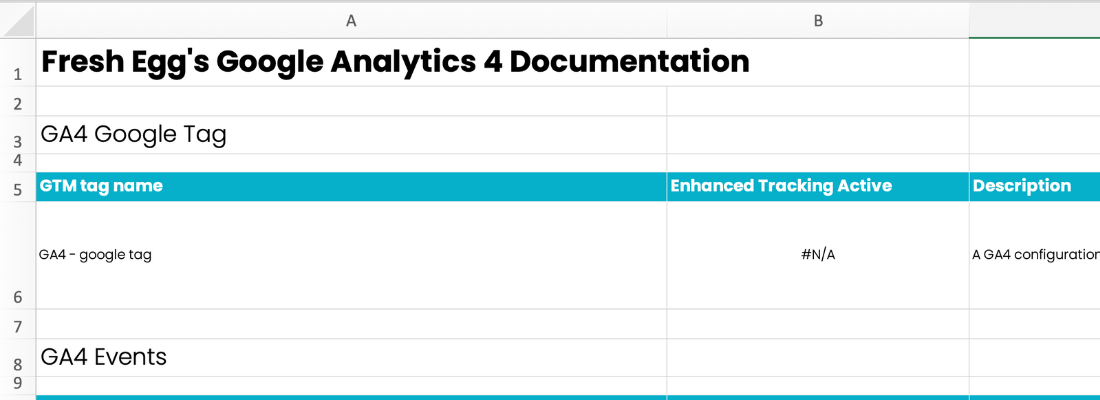
Tab #1: GA4 Events
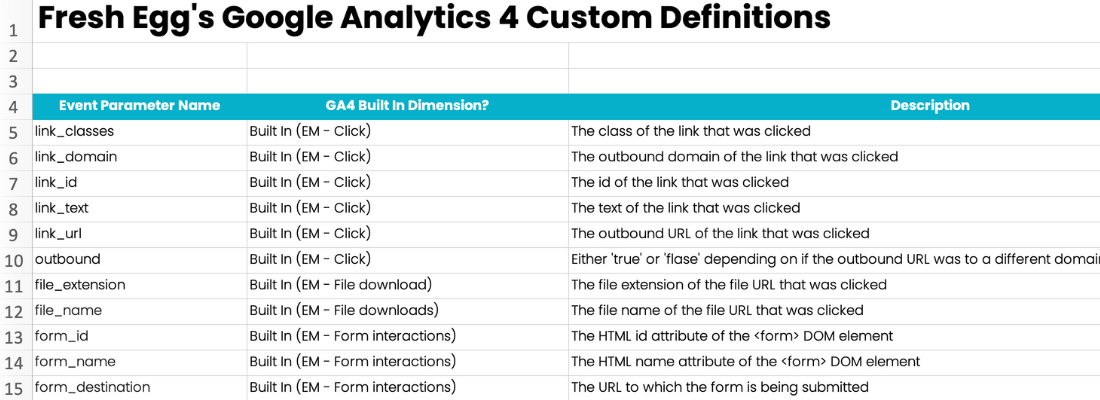
Tab #2: GA4 Dimensions
Tab #1: GA4 Events
This is the most critical part of our GA4 Documentation. This tab lists your GA4 events and your GA4 event parameters. We always find ourselves returning to this tab to search for what GA4 event parameters have been added to GA4 events. It's also great to show your team the range of tracking pulling into their GA4 property. We then have the following column definitions:
GTM tag name: The name of the GTM tag which fired the event [This may not be applicable if you don't use GTM]
GA4 Event name: The name of the GA4 Event
Description: A description of where the GA4 Event is triggered
Event Parameters: The list of custom event parameters collected with that GA4 Event
Status: The status of the event, allowing you to track new and in-progress events
Notes: A space for any special notes. A helpful feature while GA4 is still missing annotations
Tab #2: GA4 Dimensions
This tab works like a glossary for GA4 event parameters and helps write their definitions. While used more rarely, it's a helpful addition. The column definitions in this sheet are as follows:
Event Parameter Name: The custom parameter name
GA4 Built-In Dimension: A place to record if the dimension preexists in GA4 and if it has been set up as a custom dimension (at user or event scope) or as a custom metric
Description: The definition of the event parameters
Status: The status of the parameter, allowing you to track new and in-progress event parameters
Are GA4 Solutions Designs the same thing?
We find this template so valuable that we use it twice: first, as GA4 documentation and then as a GA4 Solution Design. So what's the difference?
GA4 documentation records the current state of your GA4 Property.
A GA4 solution design uses the same template to plan the GA4 event structure before building the property.
It puts on "paper", in detail, the design of the GA4 data structure while you're in planning.
Doing this provides a super helpful step to ensure the careful planning of naming conventions beforehand.
When we plan a GA4 property from scratch, the GA4 solution design phase is always the step that follows a Measurement Plan – see blog post here.
What do you need to do to get the most out of the GA4 documentation?
- Build it out: As with most things, the most essential step is to START. Build out your documentation for your GA4 setup.
- What source to build it from: You can create your documentation from GTM or GA4. We recommend using GTM as you'll benefit from seeing GA4 events and event parameters that should work, but they've stopped collecting data.
- Share it around: Distribute the documentation to your team and show everyone how to interpret it.
- Keep it up to date: Regular updates are essential. We recommend checking and updating your documentation at least once a month. Staying current helps prevent discrepancies and ensures new team members can get up to speed quickly.
💡 Top Tip!
Consistency is vital. Ensure that custom dimensions and metrics are consistently named and documented across GTM and GA4. A consistent naming structure will save time and reduce data analysis errors.
Conclusion
By following these guidelines and utilising our template, you can maintain comprehensive and effective GA4 documentation, making it easier to manage your analytics setup and gain valuable insights from your data.
Can I automate GA4 Documentation?
Automation and efficiencies are currently trending themes in analytics. To work with us and learn how to automatically populate your GA4 documentation, get in touch.